
05 / BEFORE YOU SWITCH
PhotoCraft vs Photoshop.
A migration checklist.
The useful question is whether your own files and workflow survive the switch. Use this checklist on a copy of a real project.
Four small PSD tests in PhotoCraft v0.7.0
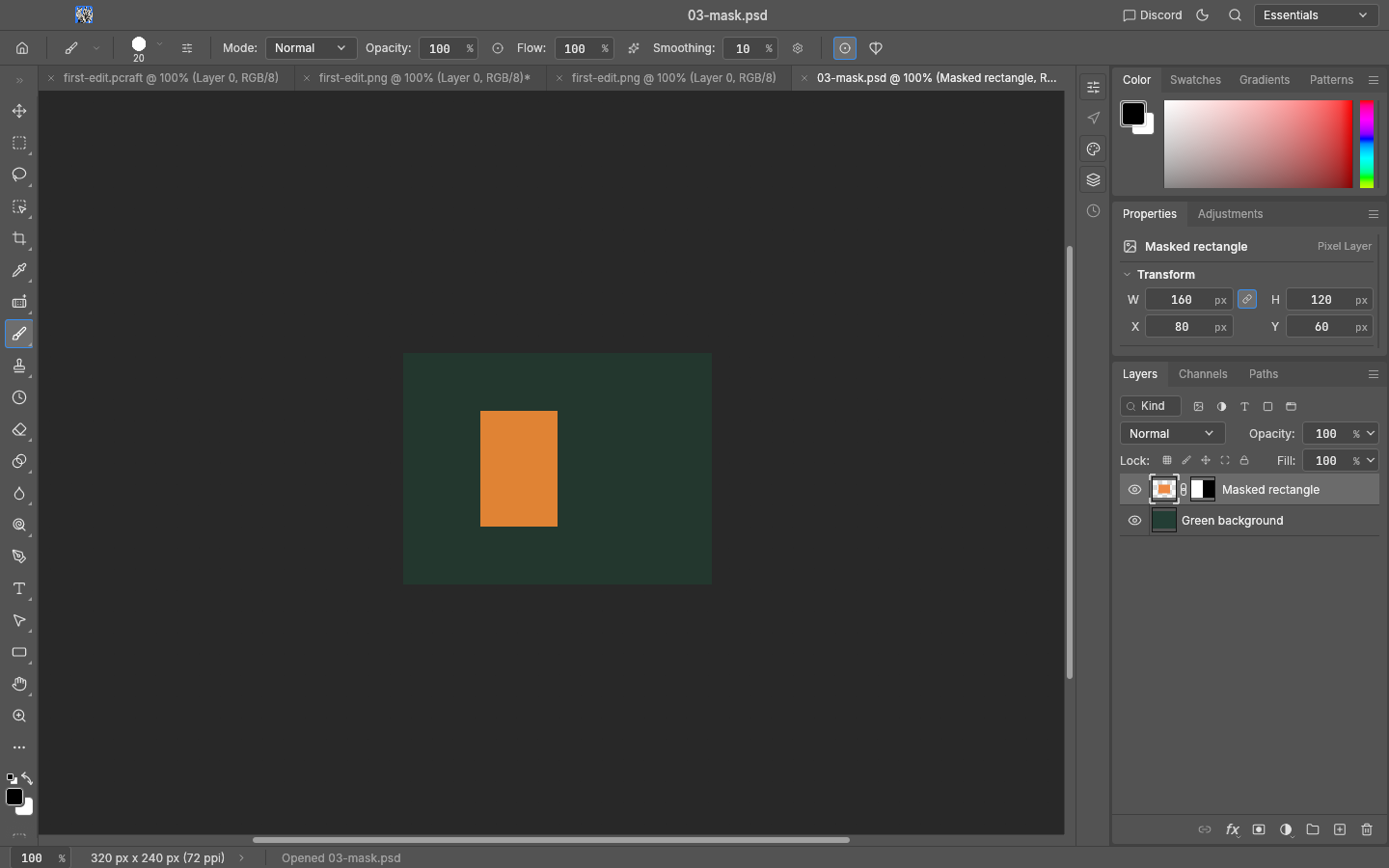
We generated four original 320 × 240 RGB, 8-bit PSD fixtures with ag-psd 31.0.3 and @napi-rs/canvas 1.0.11. On 12 October 2026, we ran the official macOS CLI: open input → save a new PSD → close → reopen → export PNG.
Photoshop was not run. These reference PNGs come from the fixture generator. This is a limited PhotoCraft test, not a rendering comparison between the two applications.
| Fixture | Recorded result |
|---|---|
| Basic layers | Green background and named orange rectangle. Import, saved-and-reopened render and PNG output matched the independent expected pixels. |
| Semi-transparent pixels | Half-alpha rectangle on a transparent canvas. The same three pixel comparisons matched. |
| Pixel mask | A black/white mask reveals the left half of a rectangle. The same three pixel comparisons matched. |
| Editable text | Point text CRAFT references ArialMT at 32 pt. Rendering differed from the generator at 489 of 76,800 pixel positions (maximum premultiplied RGBA channel difference: 26/255). PhotoCraft’s own saved-and-reopened render and PNG export matched. Changing text to CRAFT EDITED, saving and reopening preserved the editable Type content. |
Independent ag-psd readback confirmed layer names/counts and the relevant mask/text metadata in the saved PSDs. Pixel agreement alone does not prove every feature remains editable. Font availability can change results. Smart Objects, effects, CMYK, PSB and production-size documents were not tested.
Download the original PSD test pack ↓
The ZIP includes four inputs, expected PNGs, saved PSD outputs, the generator, results JSON and a README explaining reproduction and limitations. No application installers or font files are included. Original fixtures and generator are CC0.
Download the test results JSON ↓
Now test your own workflow
| Area | PhotoCraft checkpoint | Your migration test |
|---|---|---|
| Cost & ownership | Upstream distributes an open-source editor. This guide charges nothing. | Check the license of any assets, fonts and extensions you add. |
| Layered files | PSD support exists; passing a corpus does not guarantee every document. | Open, save to a new name, reopen, and compare to a reference render. |
| Fonts & layout | Typography and professional workflows are areas called out by upstream. | Check missing fonts, line breaks, spacing and mixed-language text. |
| Plugins & actions | Do not assume Photoshop extensions or action files can be imported. | List the extensions you rely on; test each supported workflow separately. |
| AI features | Agent control is different from generative image features. | Check the exact tool you need against the current release notes. |
| Delivery | An early-alpha label matters when work has a deadline. | Keep your existing editor and source files until the full job passes. |
A sensible first project
Try a small personal image with a few layers and a simple export. For client delivery, complex type, color-critical print or plugin-heavy work, validate the whole chain before changing your primary editor. We have not certified application parity or benchmarked your hardware.
Run the first-edit checklist →